How To Edit Instagram Reels Like A Professional: Complete Guide To Creating Viral Short-Form Videos
A simple 30-second video can generate thousands or even millions of views — but only when the content is edited strategically.
The difference between an average Reel and a high-performing Reel is often not the camera quality.
It is the editing.
Professional Instagram Reel editing combines powerful hooks, engaging captions, smooth transitions, B-roll footage,
motion graphics, sound design, and storytelling techniques to keep viewers watching.
Why Professional Instagram Reel Editing Matters
Instagram users scroll through hundreds of videos every day. Your Reel has only a few seconds to capture attention
before someone decides whether to keep watching or move on.
Professional editing helps transform ordinary footage into engaging content that keeps viewers interested.
Increase Viewer Retention
Viewer retention is one of the most important factors behind successful short-form videos.
The longer people watch your Reel, the stronger signal it sends to Instagram’s algorithm.
Professional editors improve retention through:
- Pattern interruptions
- Fast-paced editing
- Dynamic captions
- Visual changes
- Story-driven sequences
Build A Strong Personal Brand
Your videos represent your brand. Poor editing can make great ideas look unprofessional, while strategic editing
can make your content feel premium and trustworthy.
Professional Instagram Reel editing helps businesses create:
- A consistent visual identity
- Professional-looking content
- Stronger audience connection
- Higher brand credibility
Convert Viewers Into Customers
Instagram Reels are not only for entertainment. They are powerful marketing tools that can generate leads,
increase website visits, and attract potential customers.
What Makes An Instagram Reel Go Viral?
While there is no guaranteed formula for creating a viral Reel, most high-performing videos share similar elements.
1. A Powerful Hook In The First 3 Seconds
The first few seconds decide whether someone watches your video or scrolls away.
A weak opening:
“Hey guys, today I want to talk about video editing…”
A stronger opening:
“Your videos are losing viewers because of this one editing mistake.”
Great hooks create curiosity and give viewers a reason to continue watching.
Types Of Viral Reel Hooks
Curiosity Hook
Example: “Nobody tells you this about growing on Instagram…”
Problem Hook
Example: “Your Reels are not getting views because you are making this mistake.”
Result Hook
Example: “Here is how professional editors make videos more engaging.”
2. Fast And Engaging Pacing
Modern audiences have short attention spans. Long pauses and unnecessary sections can quickly reduce watch time.
Professional Reel editing improves pacing by:
- Removing unnecessary pauses
- Cutting repeated sentences
- Using jump cuts
- Adding zoom effects
- Changing visuals throughout the video
3. Captions That Increase Watch Time
Many people watch Instagram Reels without sound, making subtitles one of the most important elements of short-form video editing.
Professional captions include:
- Animated subtitles
- Highlighted keywords
- Custom fonts
- Brand colors
- Perfect timing with speech
4. Visual Changes Throughout The Video
A talking-head video can become boring when the screen remains unchanged for too long.
Professional editors add visual elements such as:
- B-roll footage
- Screen recordings
- Images
- Motion graphics
- Text animations
5. Strong Storytelling
The best-performing Instagram Reels are not just edited clips. They tell a story.
A simple storytelling structure:
- Hook: Grab attention
- Problem: Identify the viewer’s challenge
- Solution: Provide value
- Call To Action: Encourage engagement
How To Edit Instagram Reels Step By Step
Step 1: Select The Best Part Of Your Footage
Before adding effects, transitions, or captions, start by identifying the strongest moments in your recording.
Ask yourself:
- What is the most interesting statement?
- What part creates curiosity?
- What information provides the most value?
Professional editors do not simply cut videos. They restructure content to create a better viewing experience.
Step 2: Remove Dead Space And Improve Retention
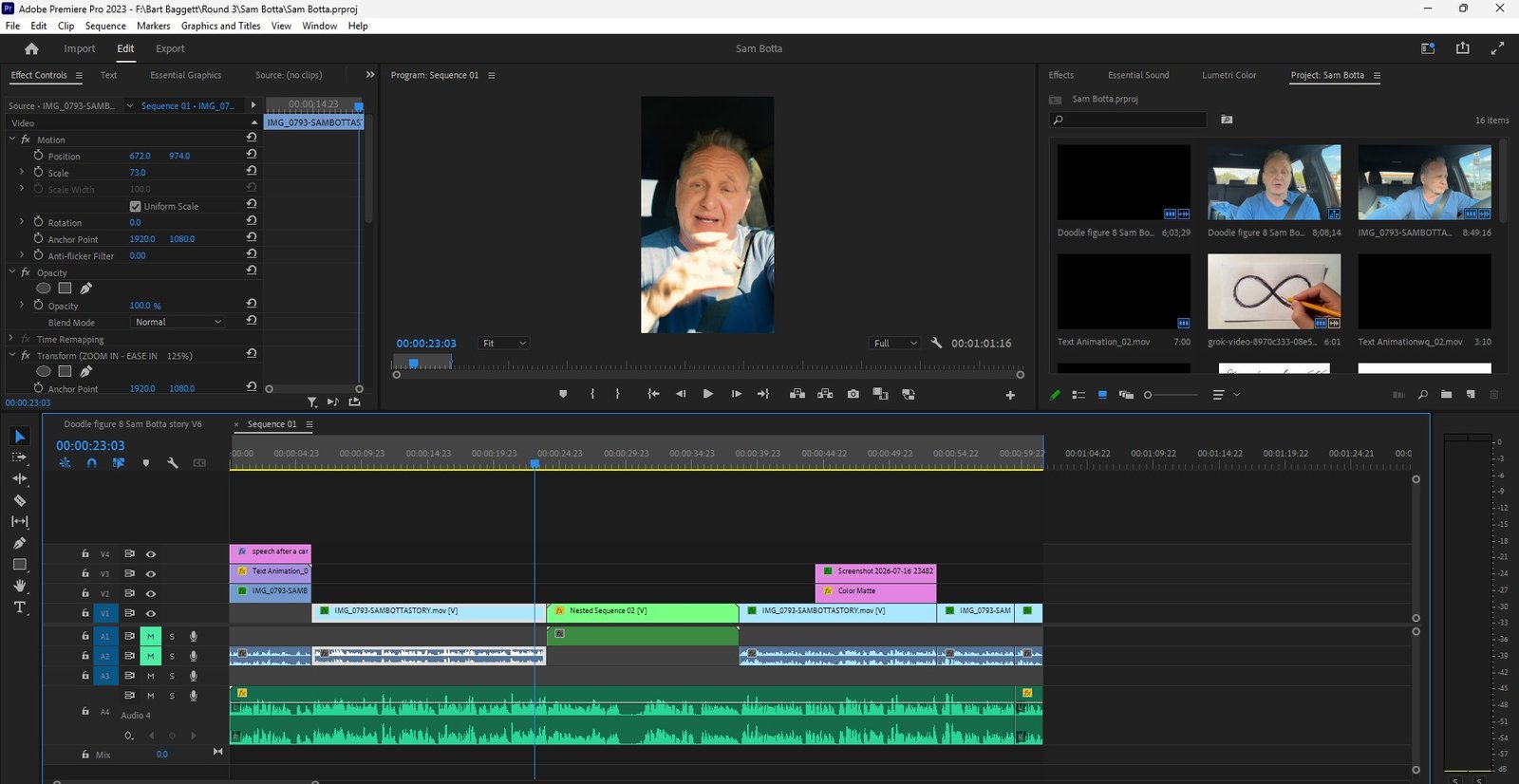
Raw footage usually contains unnecessary pauses, mistakes, repeated sentences, and slow sections that reduce viewer engagement.
Professional Instagram Reel editing removes these distractions and creates a smoother experience.
The goal is not simply to make videos shorter. The goal is to make every second valuable.
Jump Cuts
Jump cuts remove unnecessary pauses and create a faster, more engaging rhythm.
This technique is commonly used by successful creators, YouTubers, and business influencers.
Remove Silence And Filler Words
Professional editors remove:
- Long pauses
- “Umm” and “ah” moments
- Repeated sentences
- Unnecessary explanations
This creates a cleaner and more confident presentation.
Dynamic Timing
Important moments can be emphasized through:
- Zoom effects
- Speed adjustments
- Text animations
- Visual changes
Step 3: Add Professional Captions And Subtitles
Captions are one of the biggest differences between amateur videos and professional Instagram Reels.
Since many viewers watch videos without sound, engaging subtitles help communicate your message even when audio is unavailable.
Keyword Highlighting
Professional editors highlight important words to guide the viewer’s attention.
Example:
Your videos need BETTER EDITING to increase engagement.
Highlighted keywords make videos easier to follow and more visually interesting.
Animated Subtitles
Modern short-form videos often use animated captions that appear with the speaker’s words.
Popular subtitle styles include:
- Word-by-word animations
- Pop-up captions
- Kinetic typography
- Motion-based text effects
Brand Style Captions
Businesses and personal brands can create consistency by using:
- Custom fonts
- Brand colors
- Logo elements
- Consistent subtitle design
Step 4: Add B-Roll Footage To Improve Storytelling
B-roll is additional footage placed over the main video to support the message and make the content more visually engaging.
Professional B-roll editing helps prevent viewer boredom and creates a more cinematic experience.
Types Of B-Roll Used In Instagram Reels
Product B-Roll
Perfect for:
- E-commerce brands
- Product demonstrations
- Business advertisements
Screen Recordings
Useful for:
- Software tutorials
- Online courses
- Marketing videos
- Educational content
Stock Footage
Stock videos can add emotion, context, and visual variety when original footage is limited.
Behind-The-Scenes Footage
Behind-the-scenes clips work well for:
- Creators
- Agencies
- Personal brands
- Businesses
Step 5: Add Sound Effects And Background Music
Audio design plays a major role in making short-form videos feel professional.
The right sound effects create emotion and improve the viewing experience.
Whoosh Effects
Whoosh sounds are commonly used for:
- Text animations
- Transitions
- Motion graphics
Transition Sounds
Small audio effects can make scene changes feel smoother and more polished.
Background Music
Background music adds energy and emotion while keeping the focus on the speaker.
Professional editors balance music levels carefully so it never distracts from the message.
Step 6: Add Motion Graphics And Visual Elements
Motion graphics can transform a simple talking-head video into engaging content that looks professionally produced.
Examples include:
- Animated text
- Icons
- Graphs
- Charts
- Callout graphics
- Logo animations
- Visual explanations
Why Motion Graphics Matter
Motion graphics are especially effective for:
- Coaches
- Consultants
- SaaS companies
- Educational creators
- Corporate brands
Instagram Reel Editing Checklist
Before publishing your Reel, make sure you check the following:
- ✅ Does the first 3 seconds grab attention?
- ✅ Is the hook clear?
- ✅ Are captions easy to read?
- ✅ Does the video have visual changes?
- ✅ Has unnecessary footage been removed?
- ✅ Does the video tell a clear story?
- ✅ Are branding elements consistent?
- ✅ Is there a strong call-to-action?
Best Tools For Editing Instagram Reels
Beginner Video Editing Tools
CapCut
CapCut is one of the most popular tools for creating Instagram Reels because it offers:
- Automatic captions
- Video templates
- Effects
- Transitions
- Easy mobile editing
Canva
Canva is useful for:
- Simple animations
- Branded graphics
- Social media designs
Professional Video Editing Software
Adobe Premiere Pro
Adobe Premiere Pro is widely used by professional video editors for advanced editing workflows.
Adobe After Effects
After Effects is used for:
- Advanced motion graphics
- Visual effects
- Custom animations
DaVinci Resolve
DaVinci Resolve is popular for professional editing and advanced color grading.
Remember: software is only a tool. The biggest difference comes from storytelling, editing decisions, and understanding audience behavior.
How To Turn Long Videos Into Viral Instagram Reels
One of the most effective content strategies today is transforming long-form videos into multiple pieces of short-form content.
A single piece of content such as a podcast episode, webinar, interview, or YouTube video can become dozens of engaging Instagram Reels.
This strategy is called content repurposing.
Examples Of Long Videos You Can Repurpose
- Podcast episodes
- YouTube videos
- Online courses
- Webinars
- Business interviews
- Client testimonials
- Educational videos
How Professional Editors Find Viral Clips
Experienced editors identify moments that have the highest potential for engagement.
They look for:
- Strong opinions
- Interesting stories
- Emotional moments
- Educational tips
- Controversial statements
- Powerful quotes
These moments are then transformed into short-form videos optimized for Instagram Reels, TikTok, and YouTube Shorts.
How Long Should An Instagram Reel Be?
There is no single perfect length for every Instagram Reel. The ideal duration depends on the topic, audience, and purpose of the video.
Recommended Instagram Reel Lengths
- Educational Reels: 30–90 seconds
- Talking Head Reels: 30–60 seconds
- Quick Tips: 15–30 seconds
- Product Videos: 15–45 seconds
The most important factor is not video length. It is viewer retention.
A 20-second Reel that people watch completely can perform better than a 90-second Reel that viewers leave halfway through.
Common Instagram Reel Editing Mistakes To Avoid
Many creators struggle to grow because their editing prevents viewers from staying engaged.
Mistake 1: Weak Opening Hook
If your first few seconds do not create curiosity, viewers will scroll away.
Mistake 2: No Captions
Without captions, you lose viewers who watch content silently.
Mistake 3: Too Much Unnecessary Content
Long introductions and repeated information reduce watch time.
Mistake 4: No Visual Variety
Keeping the same camera angle for the entire video can make content feel boring.
Mistake 5: Ignoring Branding
Professional brands use consistent fonts, colors, and visual styles to create recognition.
Want Professional Instagram Reels Without Spending Hours Editing?
Creating high-performing Instagram Reels requires more than simply cutting clips together.
You need strategic editing, storytelling skills, design knowledge, and an understanding of what keeps viewers watching.
At Zeeshanu Online, we help creators, entrepreneurs, coaches, and businesses transform raw footage into professional short-form videos that are designed for engagement.
Our Instagram Reel Editing Services Include:
- Professional video cuts
- Viral-style hooks
- Dynamic subtitles
- Custom fonts and brand colors
- B-roll integration
- Motion graphics
- Sound effects
- Background music
- Social media optimization
Whether you create podcasts, educational content, interviews, tutorials, or personal brand videos, our editing team can help you turn your ideas into engaging content.
Ready To Turn Your Raw Videos Into Professional Instagram Reels?
Stop spending hours editing. Focus on creating content while our team handles the editing.
Frequently Asked Questions About Instagram Reel Editing
How do I edit Instagram Reels professionally?
Professional Instagram Reel editing involves creating a strong hook, removing unnecessary footage, improving pacing, adding captions, using B-roll, adding sound effects, and optimizing the video for audience retention.
What is the best app for editing Instagram Reels?
CapCut is a popular choice for beginners because of its templates and automatic captions. Professional editors often use Adobe Premiere Pro, Adobe After Effects, Final Cut Pro, and DaVinci Resolve for advanced editing.
How do I edit a Reel on Instagram?
Instagram provides basic editing features including trimming clips, adding music, text, filters, and effects. For professional results, creators often use dedicated video editing software before uploading their Reels.
Can I edit a Reel after posting it?
Instagram allows you to edit some details after publishing, such as captions, tags, and settings. However, you usually cannot replace the actual video file once the Reel is posted.
How long should an Instagram Reel be?
The best Reel length depends on the content type. Educational videos often perform well between 30 and 90 seconds, while quick tips and promotional clips can work well between 15 and 45 seconds.
How much does professional Instagram Reel editing cost?
The cost depends on factors such as video complexity, editing style, number of videos, captions, motion graphics, B-roll requirements, and turnaround time. Many creators and businesses choose monthly editing packages for consistent content creation.
Why are my Instagram Reels not getting views?
Common reasons include weak hooks, poor retention, lack of captions, slow pacing, inconsistent posting, and videos that do not provide enough value to viewers.
Related Resources
- Instagram Reel Editing Services
- Short Form Video Editing Services
- YouTube Video Editing Services
- Professional Video Editing Portfolio
Final Thoughts
Instagram Reels are no longer just entertainment videos. They have become powerful marketing tools for creators, brands, and businesses.
The right editing strategy can transform ordinary footage into content that captures attention, builds trust, and generates opportunities.
By using strong hooks, engaging captions, professional pacing, B-roll, motion graphics, and storytelling techniques, you can create Instagram Reels that viewers actually want to watch.
If you want your content to look professional and stand out in a crowded social media landscape, investing in high-quality Reel editing can make a significant difference.
Create better videos. Keep viewers watching. Grow your brand.